
The best second brain apps for thinking, planning, and staying organized in 2026
If you want a second brain that helps you think more clearly and stay organised, these are the best picks for 2026:
Mem for an AI second brain that organises itself
Obsidian for deep thinking and linked notes
Radiant for people in lots of meetings
Notion for flexible, visual systems
Tana for structured thinking that grows as you write
Heptabase for those who think visually and plan with whiteboards
Tool | Best for | Key features | Pros | Cons | Pricing |
Mem | People who want a second brain that organises itself | AI-powered organization, automatic tagging, fast retrieval, mobile app | Zero maintenance, excellent search, great for capturing without thinking | Can feel too loose, limited control if you enjoy designing systems | Paid plans only (typically mid-range personal productivity pricing) |
Obsidian | Non-linear thinkers who want control and local storage | Local Markdown vaults, backlinking, graph view, plugin ecosystem, integrates with COG AI workflows | Fully private, endlessly customisable, great for connecting ideas | Easy to overcomplicate, setup requires learning curve | Free core app, optional paid sync and publish |
Notion | People who want an all-in-one workspace for tasks, docs, and notes | Databases, templates, flexible views, Notion AI for summarising and drafting | Easy to customize, strong at project and knowledge hubs, great collaboration | Systems can become high maintenance, can feel slow for large workspaces | Free personal tier, reasonable paid plans |
Radiant | People whose most important work happens in meetings and want a second brain that builds itself | On-device meeting capture, instant summaries, decisions, actions, ready-to-send drafts | Automatic context, no bots, structured memory from calls, fast follow-ups | Mac only, not for people who are rarely in meetings | Currently free while in open beta |
Tana | Connected thinkers who want structure that emerges naturally | Supertags, AI-assisted cleanup, daily notes, linked structure | Powerful but simple workflows, automation without heavy setup | Was invite-only for a long time, conceptual learning curve | Subscription required |
Heptabase | Visual thinkers handling complex ideas or research | Card-based whiteboards, clustering, PDF annotation, AI summarisation | Perfect for mapping information, great for synthesis, intuitive once set up | Desktop first, fewer collaboration features than Notion, can feel pricey for casual use | Paid plans only |
Why second brains became popular
Second brain tools didn’t take off because people suddenly fell in love with productivity trends. They became popular because knowledge workers reached a breaking point. Too many tabs. Too many conversations. Too many ideas slipping away. Most people needed a reliable offload system so their minds could spend more time thinking and less time remembering.
Tiago Forte’s CODE method (Capture, Organize, Distill, Express) gave people a simple process they could follow. It also made something obvious: your brain is for having ideas, not keeping all of them in active memory. As people adopted these habits, many unknowingly built lightweight personal knowledge management systems along the way, similar to the simple approach we outline in our guide on how to create a PKM system.
Some of the rise was driven by people whose minds work fast or differently. ADHD, autism, and other forms of neurodivergency often come with rapid idea generation, associative thinking, and executive load challenges. Many of those users were already exploring personal knowledge management through that lens.
How second brain tools evolved
2000s: Evernote and the cloud
Evernote helped define the modern era of cloud-based personal note-taking. It made the idea of a searchable, cross-device “backup brain” feel accessible to a broad audience. Over time, added features, pricing changes, and growing competition from simpler or built-in apps led many long-time users to reconsider their setup.
2019–2020: Roam Research
About a decade later, Roam Research popularised bi-directional links and graph-style thinking in a way that caught the attention of knowledge workers and PKM enthusiasts. Instead of nested folders, Roam encouraged networks of ideas, helping many people see personal knowledge bases as living graphs rather than static archives.
2016–2021: Notion
Notion’s public release in 2016 and rapid growth after 2019 turned “second brains” into customizable workspaces rather than just note collections. Its mix of pages, databases, templates, and different views let individuals and teams design their own systems for projects, documents, and tasks all inside one flexible interface.
2020–2021: Obsidian
Obsidian emerged at the start of the 2020s and brought local-first, Markdown-based knowledge management back into the spotlight. It appealed to people who cared about owning their files, extensibility, and deep customization, with plugins and custom workflows that could grow alongside their ideas.
2020–2023: AI-first note tools
In the early 2020s, tools like Mem began to lean heavily into AI-led organisation and resurfacing. Instead of asking users to design elaborate folder systems, these apps focused on quick capture, semantic search, and automatic reminders of what mattered, nudging the category toward “self-organising” second brains.
2024–2025: Radiant and workflow-native second brains
The latest wave centres on tools like Radiant that build a second brain directly around everyday workflows, especially meetings. Rather than just recording calls, Radiant quietly captures your meetings, turns them into structured summaries, and drafts follow-ups and updates in your existing tools. This shifts second-brain thinking from static storage toward live, automated execution woven into daily work.
How we evaluated these tools
To compare second brain apps fairly, we looked at each one across the five criteria that matter most to people doing modern knowledge work:
1. Day-to-day usability
Is it easy to learn how to use? Does it help you think, not slow you down?
2. Speed and friction
How quickly can you capture something? Can you find it again with zero stress?
3. Flexibility
Does the tool support different thinking styles without forcing a rigid structure?
4. Long-term reliability
Will your notes still be accessible years from now? How portable is your data?
5. Real-world workflows
Does the tool support how people actually work — from meetings and research to daily planning and creative thinking?
We also looked at Reddit threads, YouTube reviews, and direct user feedback to understand how each tool performs rather than just what it claims on the website.
If you want to understand how these tools fit into a wider AI workspace ecosystem, we break down the bigger picture in our guide on AI workspaces explained.
The best second brain apps, reviewed
Mem
Best for: people who want a second brain that organises itself in the background
Mem 2.0, announced in October 2025, is a complete rebuild designed to make the app faster, more reliable, and more capable as an AI partner. It adds offline support, smarter capture tools like voice mode, and a more agentic AI layer that can act on your notes instead of only organising them. Even with the overhaul, it keeps Mem’s core promise intact: you drop in thoughts, and it quietly makes them usable.
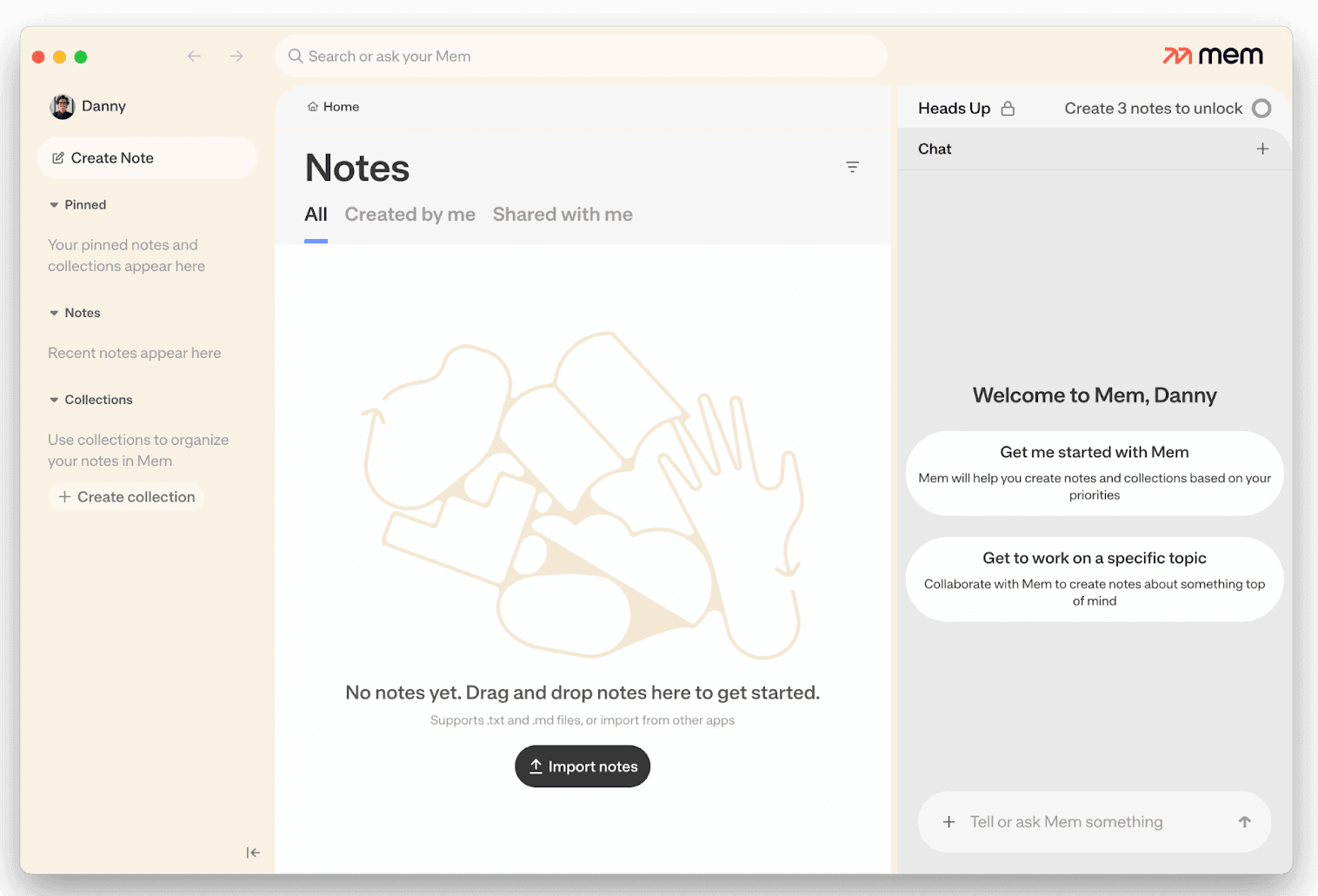
Mem 2.0’s redesigned home screen, which now combines notes, collections, and an AI chat panel to help you capture and organise ideas with less setup.
Mem is one of the few second brain apps that genuinely lowers your shoulders the moment you start using it. You don’t need to think about folders or structure. You just write and Mem quietly does the organising for you.
One reviewer on Reddit put it perfectly: they said Mem was the only tool where they felt relieved after taking a note, because they didn’t have to think about where it lived or how they’d find it again. That lines up with my experience. When you drop something into Mem, you trust it won’t disappear into a black hole.
It’s not perfect. The structure-light approach can feel too loose if you love clearly defined systems. Some people will want more control than Mem is willing to give. But if your goal is to have a reliable, low-maintenance repository, it nails that use case better than almost anything else.
Why it works as an AI-supported second brain
Mem shines at the exact pain point where most second brain systems fall apart: retrieval. Note-taking is easy; finding things later is hard. Mem flips that dynamic by letting AI handle the classification and resurfacing so you don’t have to keep the system alive manually. The less you manage it, the better it works.

Best for you if:
You want a tool that handles structure automatically
You capture lots of notes but rarely review them
You value fast, AI-powered retrieval
You want everything in one place, including mobile use
What users think:
Across Reddit, reactions to Mem 2.0 range from impressed to conflicted. Many people who’d written off earlier versions say the upgrade feels dramatic, describing it as “night and day” and praising how well the AI now organises messy notes or connects related ideas. Others highlight the new handwriting recognition and PDF reading as standout improvements.
At the same time, the community is open about the rough edges. Several users mention slow performance, missing integrations, or uncertainty about whether the pricing feels right for what Mem offers today. A few long-time testers also point out frustrations with export options, task management, and features that still feel behind other AI-driven tools.
A snapshot of common reactions:
“Night and day compared to the old version.”
“AI organising my chaos… game-changing.”
“I’m just not sure it’s worth the price yet… it doesn’t feel fun to use.”
“I’m having great success doing everything through the AI chat — it’s organising everything.”
“It feels slow sometimes, which makes the price harder to justify.”
“Best retrieval I’ve used, but I wish the task system was better.”
Overall, people see Mem 2.0 as a big leap forward, especially for retrieval and automated organization, even if performance and deeper workflow features continue to shape how users feel about sticking with it long term.
Obsidian
Best for: people who want total control, local storage, and deep connections
Obsidian is the tool people graduate into. It’s powerful, extensible, endlessly customizable, and surprisingly lightweight once you get the hang of it. But it can also be the place where second brains collapse under their own complexity if you stack too many plugins or frameworks on top of each other too quickly.
At its core, Obsidian is just Markdown files stored locally on your device. That simplicity is a feature, not a limitation. It means you own your notes completely, they are portable to any future tool, and you can use any workflow or structure that suits the way your brain works.
Where Obsidian becomes genuinely special is in the way it lets you connect ideas. Backlinks, graph views, knowledge maps — it’s perfect for people who think in links and patterns rather than rigid hierarchies.

Why it works as an AI-supported second brain
While Obsidian can be complex, it also allows for minimal-maintenance systems. One of the most interesting emerging approaches is a system called COG, which stands for Claude + Obsidian + Git.
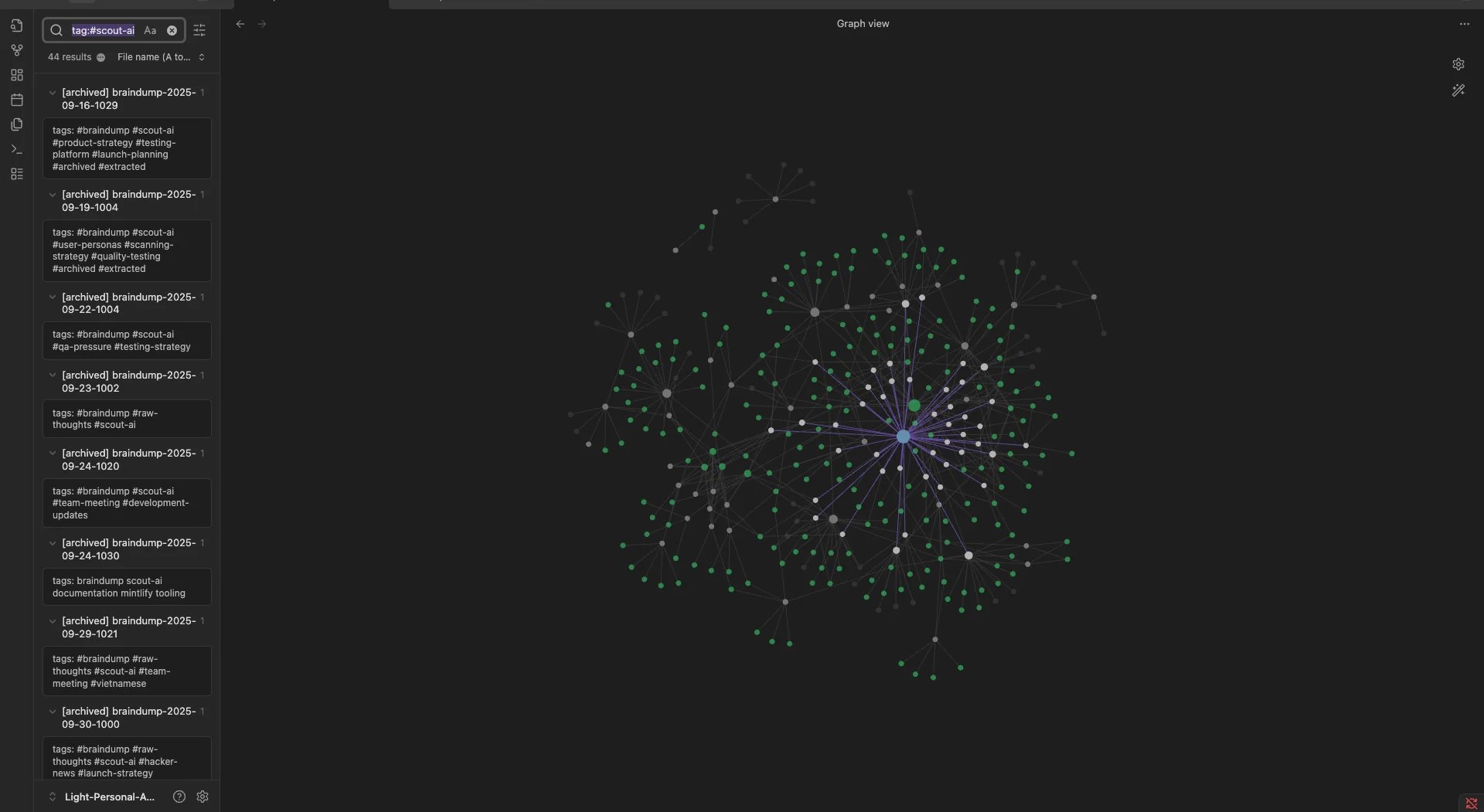
Source: 0xlight, r/ObsidianMD
COG is essentially a self-organising second brain built on top of Obsidian. The idea is simple:
You dump messy thoughts into Obsidian
AI (Claude) automatically organises, categorises, and links them
Everything stays in plain Markdown files
Git keeps a full history of your thinking
You don’t do any manual filing or maintenance
It’s built for people who love capturing ideas but never want to tag, reorganise, or structure them by hand. If you’re the type who can take notes all day but never gets around to reviewing or sorting them, COG is a clever way to let AI handle the parts you’d normally abandon.
It won’t be for everyone, but it shows what Obsidian can become when you combine a flexible foundation with the right kind of automation. While it’s brilliant for deep thinking, it’s not the fastest tool for quick capture, especially on mobile, so it fits best when you have time to think rather than when you need instant drop-and-go notes.
Best for you if:
You want total control and local-first storage
Your thinking is non-linear and relies on connections
You want an AI-supported system that reduces manual maintenance
What users think:
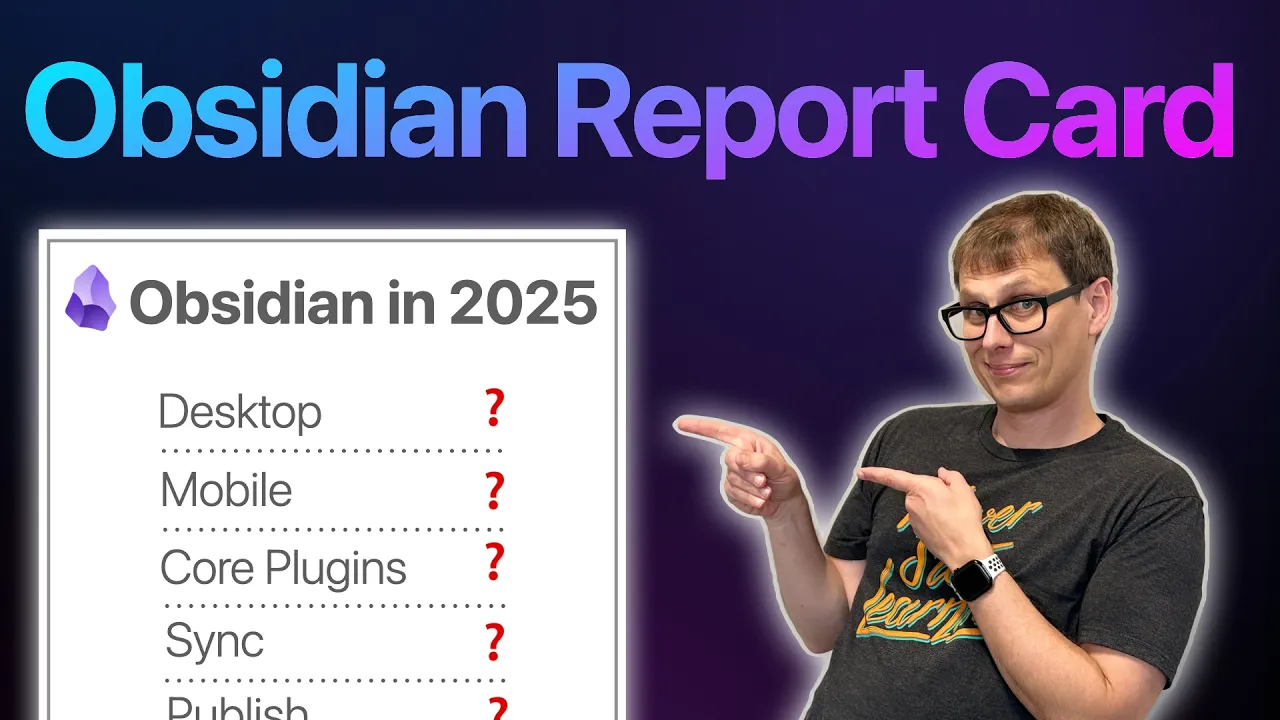
Across reviews, including this detailed look from Android Authority and a 2025 community report card from creator Mike Schmitz, the consensus is remarkably consistent: Obsidian is one of the most powerful second-brain platforms available, but it asks a little more from you than other tools.
“The desktop app is practically perfect — fast, clean, and handles huge vaults without blinking.”
“Mobile is fine for reference, but not great for quick capture. It needs work.”
“Community plugins are incredible, but long-term maintenance is hit-or-miss.”
“I love owning my notes. Knowing everything is just Markdown gives me peace of mind.”
“Obsidian clicked for me when I stopped chasing the perfect setup.”
Most reviewers place Obsidian in the “expert tier” of second brain tools due to its unmatched flexibility and longevity, as long as you don’t mind shaping it a little to fit your brain.
Notion
Best for: people who want a flexible, visual workspace for notes, tasks, and knowledge
Notion is the tool most people stumble into long before they ever say the words “second brain.” Teams use it for company docs, project hubs, hiring pipelines, and internal wikis, so for many knowledge workers it becomes their first exposure to the idea of storing thinking outside their head. If you’ve ever joined a business where everything lived in Notion, you’ve already brushed up against knowledge management without noticing.
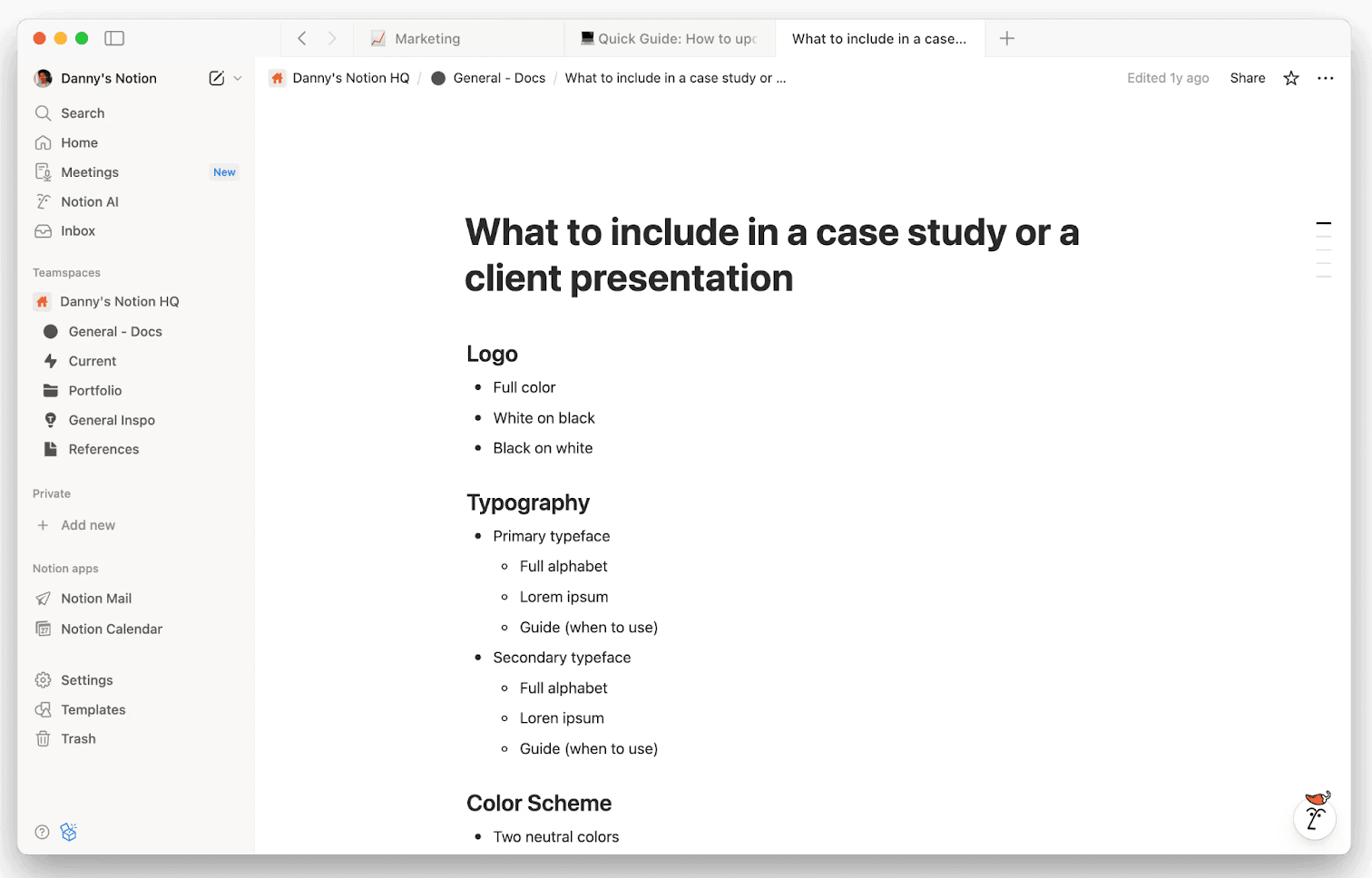
Notion’s flexible pages let you structure documents, brand guidelines, and project materials in one place, making it easy to build reusable templates.
As a second brain, Notion feels instantly powerful. You can mix documents, databases, meeting notes, tasks, and lightweight knowledge bases in one place. You can switch views whenever you want: table, gallery, calendar, Kanban. That flexibility makes it easy to build a system that feels like yours.
The catch is that freedom can become its own tax. Many people design beautiful setups that quietly collapse because they require constant maintenance. It’s deceptively easy to spend more time perfecting your system than actually using it.
Why it works as an AI-supported second brain
Notion is ideal if you need structure without coding or configuring plugins. PARA templates, weekly review dashboards, and task databases are simple to set up. Notion AI also helps tidy notes, summarise pages, pull out highlights, or turn scattered thoughts into something actionable, all without switching tools.
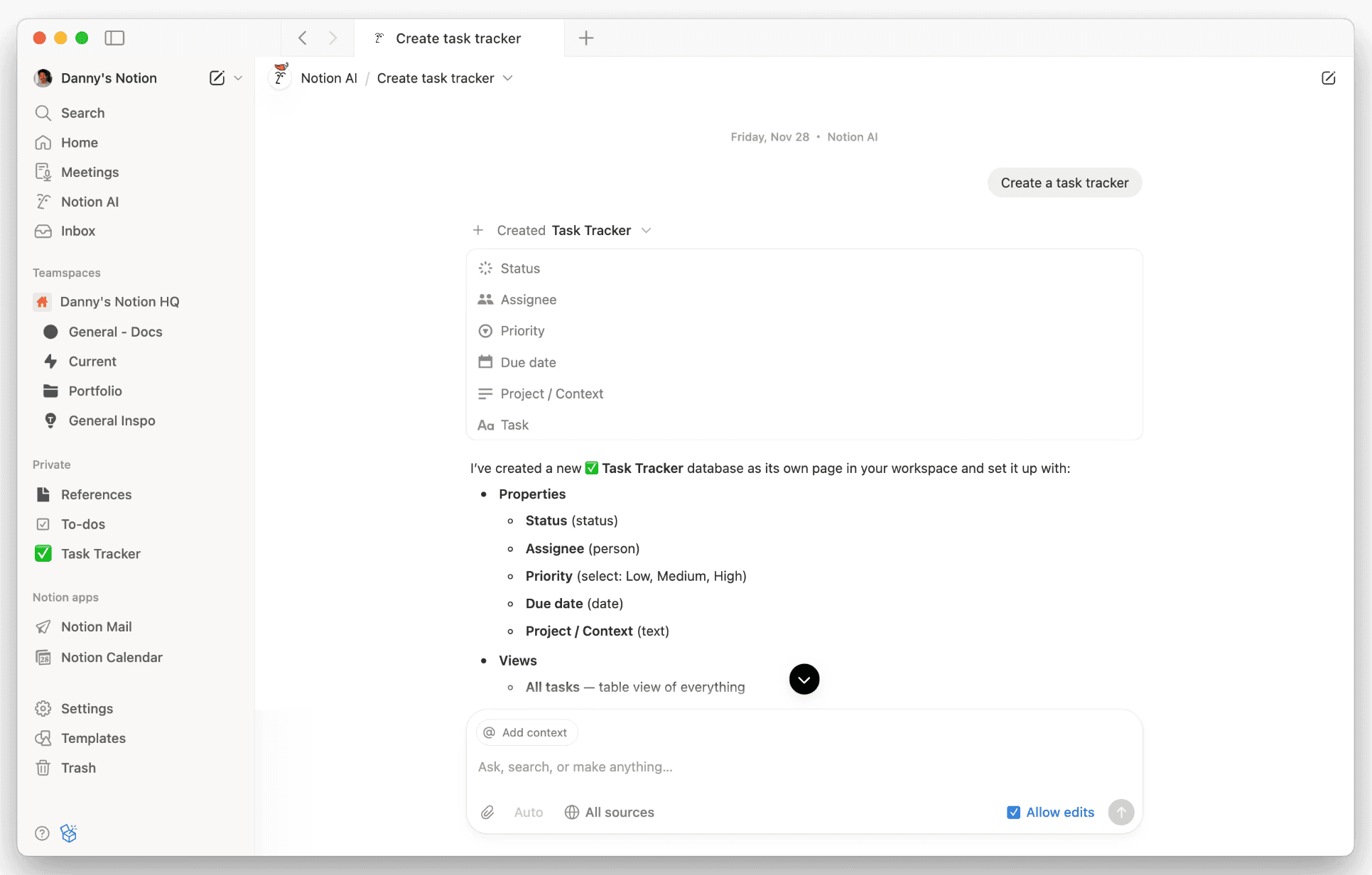
Notion AI can generate full databases like this task tracker, complete with properties and views, turning a simple prompt into a structured workspace.
And because so many companies already run on Notion, using it personally can create a sense of continuity. Your work notes, project docs, and reference material already live there, so adding your own second brain on top feels natural.
Best for you if:
You like visual organization and flexible views
You want a single workspace for tasks, notes, docs, and knowledge
You prefer templates over tinkering
You want built-in AI but don’t need deep customisation
Your workplace already uses Notion and you want a system that fits around it
What users think:
Looking at the community responses on Reddit, people tend to fall into two camps: those who love Notion’s flexibility, and those who find it overwhelming or too much work to maintain.
Here’s a snapshot of the most common themes:
“I really love Notion… I use it daily for solo projects and organising my household.”
“It gets a bad rep because people optimise it instead of doing the actual work.”
“I tried so hard but it felt like too much work. I want something that just works, not something I have to build.”
“I love the UX overall… the most complete docs experience I’ve found.”
“It’s cluttered and time-consuming. I deleted it the same day I installed it.”
“It does too much and too much is going on.”
“Databases are very practical. I put all my college notes in Notion.”
“The newbie mistake is using someone else’s over-designed template. Start simple.”
Overall, users who take the time to shape Notion around their workflow tend to swear by it. Users who want something lightweight, fast, or opinionated often bounce after a day or two.
Radiant
Best for: people who want their meeting insights turned into summaries, actions, and drafts automatically
Radiant is for people whose workday revolves around meetings. Instead of starting with blank pages and frameworks, Radiant captures your calls on your Mac, then uses that context to generate summaries, next steps, action items, and ready-to-use drafts you can copy into Slack, Gmail, Linear, or anywhere else you work.
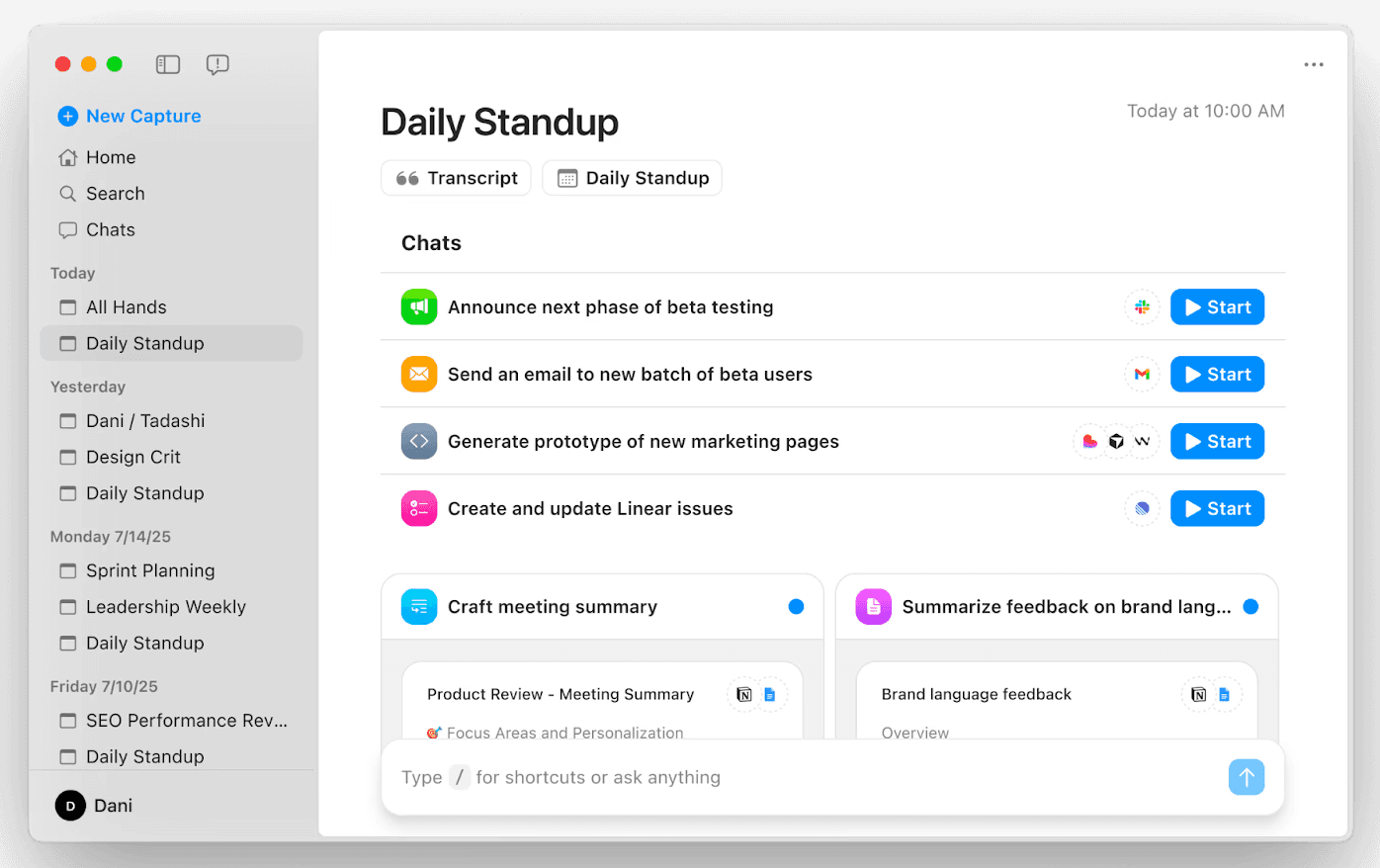
Radiant’s home screen brings your day into focus, surfacing upcoming meetings, instant summaries, and suggested follow-ups so you can move from conversation to action.
If Notion, Obsidian, and Mem start with notes you write yourself, Radiant starts with the conversations that already fill your calendar. It becomes the automatic layer of memory between what happened in a call and what needs to happen next.
“It’s fascinating that we can help you document the conversations, but it’s way more interesting if we can help you do the work after the conversations.” - Colin Treseler, Radiant Co-Founder
For people who spend most of their day switching between internal standups, client reviews, creative syncs, and project check-ins, that shift from “notes” to “doing the work” is the whole point.
Why Radiant works as an AI-supported second brain
Radiant’s strength is how it handles context. Every meeting you finish becomes a searchable, structured record with summaries, decisions, and actions. You can reopen a past call and instantly see what was agreed, what slipped, and what needs to be followed up. This removes the mental load of remembering fifty moving parts across fifteen conversations a week.
Radiant can also generate contextual drafts for you. Need a follow-up email, a project update, or a summary for your marketing lead? Radiant writes a starting point using the content of the meeting itself. It feels like your second brain is not just storing information but helping you act on it.
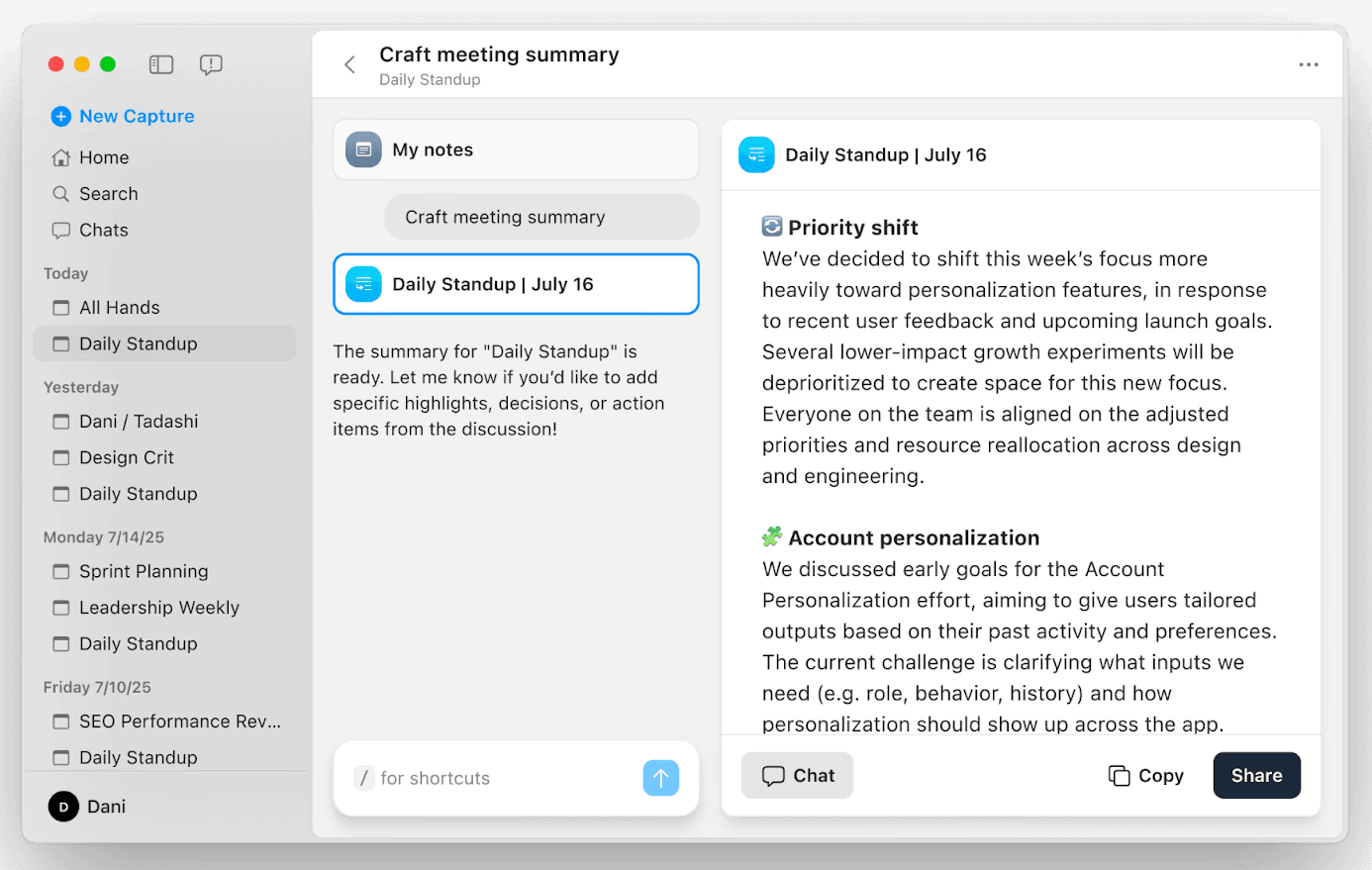
Radiant generates clean, structured summaries for every meeting, capturing decisions and key points so you can review information or share updates without rewriting notes.
Best for you if:
You focus on high-stakes knowledge work that happens during calls
You want automation to turn conversations into actionable memory
Your week is built around meetings and live conversations
You need a reliable way to turn discussions into actions without rewriting notes
You want a second brain that works automatically rather than one you have to maintain
You prefer on-device capture and a private workflow
You often think “what did we decide in that call?” and want instant clarity without digging
What users think:
Radiant is still early, but the sentiment from users so far is consistently strong. People who rely heavily on meetings say it saves them meaningful time and produces cleaner, more actionable outputs than most tools in the category. A few themes stand out both in direct user feedback and in early reviews like this one from The Business Dive.
“I’ve been using Radiant for the last few months, and it’s become an essential part of how I capture and repurpose my meetings… It can prioritise among all the things discussed in a meeting and rarely gets it wrong.”
“The accuracy of the content is one of the best I’ve used so far… My clients were impressed with the MoM pointers it generates.”
“Confirmed working! Great speed. Enjoying the pace of updates.”
“As a video production company… having a shortcut like this that can instantly generate structured, creative thinking is incredibly useful for us.”
Several users mentioned they’d like optional video recording in the future, especially for training sessions or calls where visuals matter.
Most people who try Radiant describe the same shift: they stop worrying about capturing meetings and start relying on the summaries, action items, and shortcut-generated drafts to move things forward.
Tana
Best for: people who think in webs of ideas and want structure to emerge automatically
Tana is one of the most ambitious second brain platforms out there. It blends the fluidity of networked notes with the structure of databases, all wrapped in a clean, fast interface that feels purpose-built for people who think in connections. If Obsidian is a blank canvas and Notion is a canvas with grids, Tana is more like a living, organic system that grows with you.
What makes Tana different is its core idea of “Supertags”. Instead of manually building databases or templates, you shape your system by tagging notes with types like “project”, “meeting”, “task”, or “idea”. Each tag can carry its own fields, views, and automations, which means your second brain becomes more structured the more you use it, rather than through hours of setup.
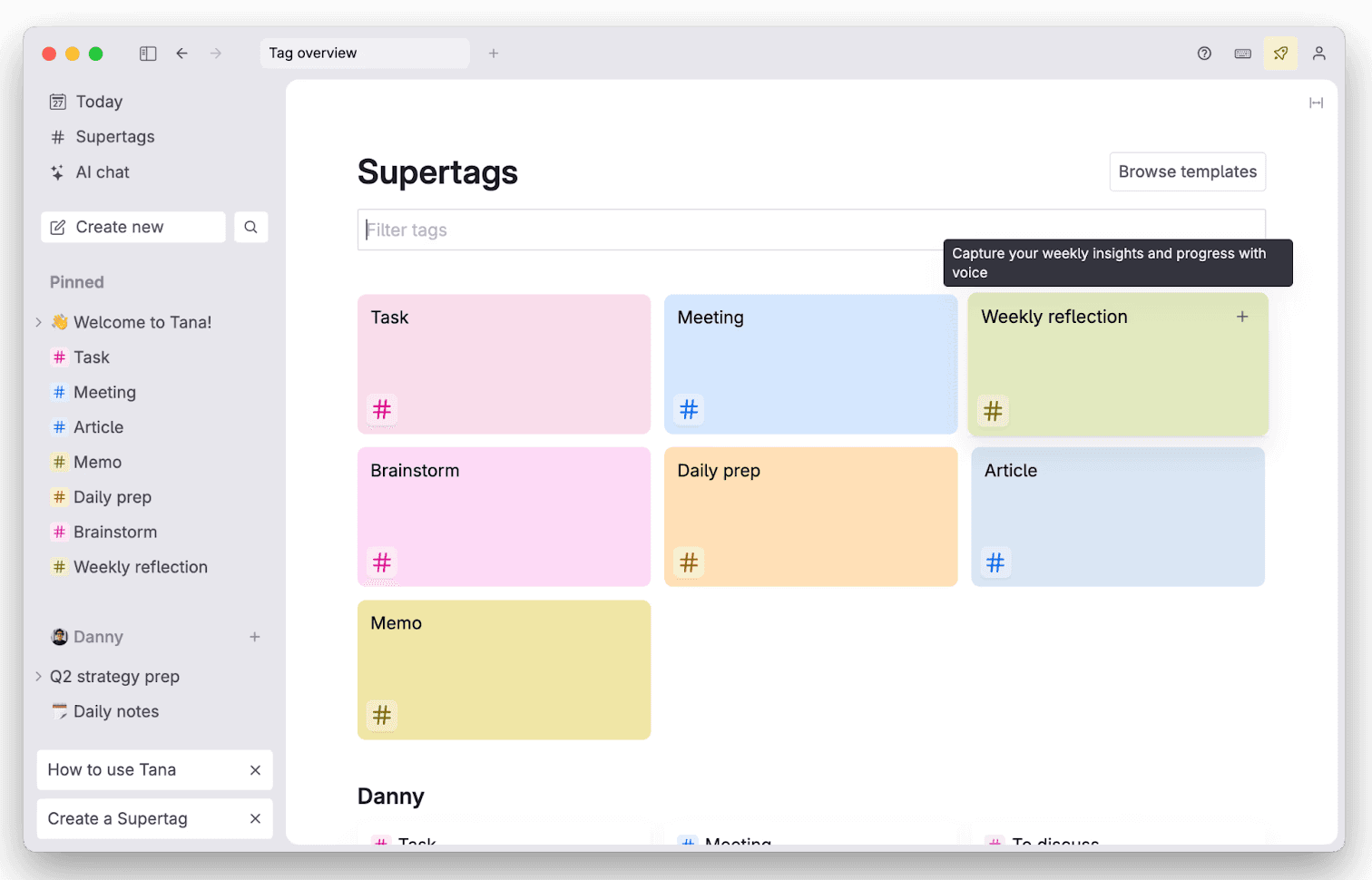
Tana’s Supertags dashboard, where structured tags turn everyday notes into an organised, connected workspace.
Why Tana works as an AI-supported second brain
Tana is incredible for people who like connected thinking but want more structure than a pure graph tool. Supertags let you build lightweight systems without feeling like you’re maintaining a database. You can write a messy daily note, tag something as a task, and it will automatically appear in your task view. No fiddling, no routing, no admin.
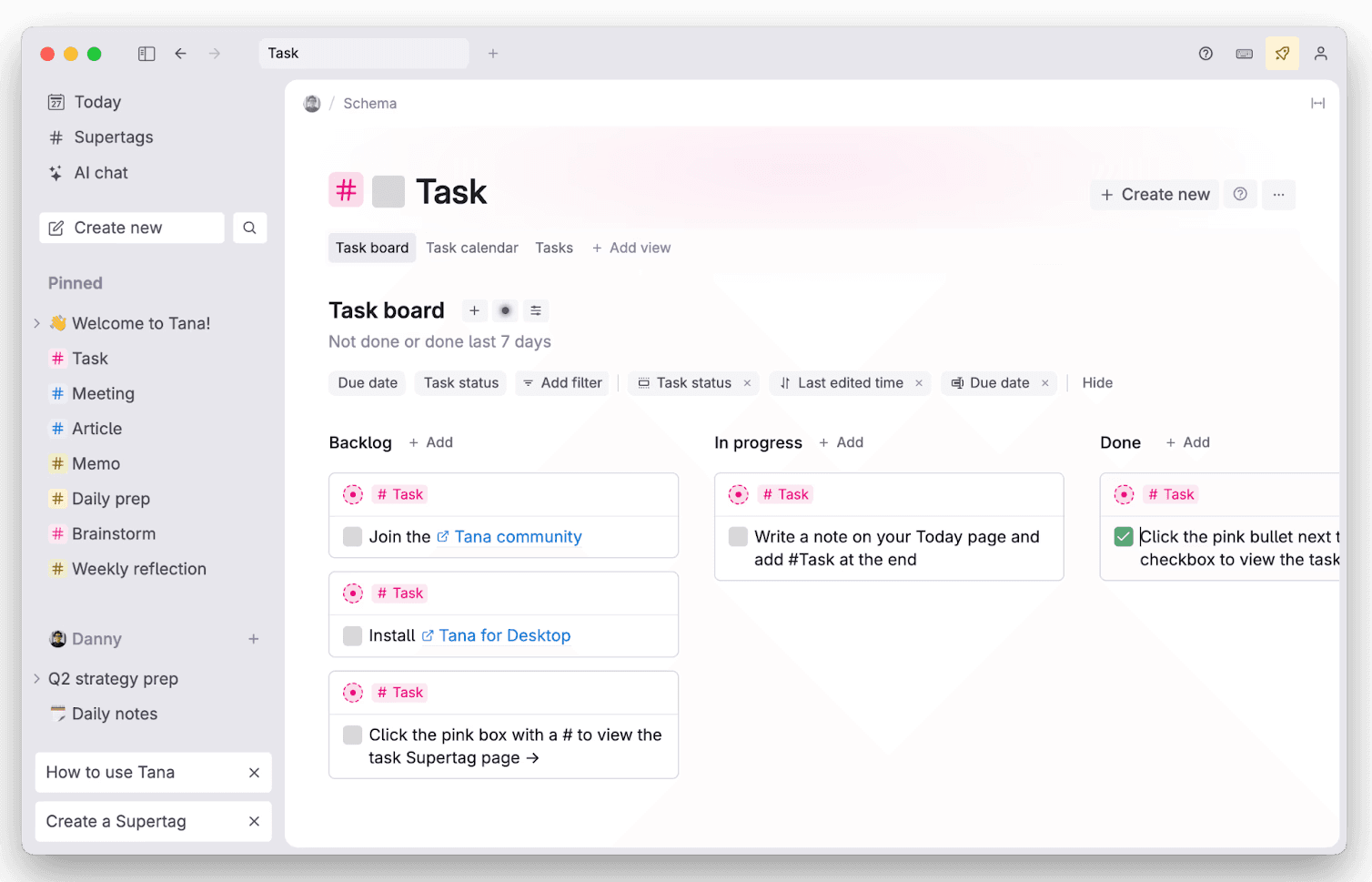
Tana’s Task Supertag turns notes into a simple, structured task board for managing work in context.
Its AI features also help clean up the chaos. You can summarise notes, extract action items, or reshape a messy brain dump into a structured outline. Paired with Tana’s ability to link everything together, it becomes a powerful place to think, plan, and revisit ideas as they evolve.
Best for you if:
You think in webs rather than folders
You like the idea of Obsidian but want something more guided
You want structure to emerge naturally from your writing
You enjoy daily note workflows
You want an AI layer that helps shape and reorganise your thinking
What users think:
Across Product Hunt, the sentiment is unusually consistent: people don’t just like Tana, they feel like it finally solves a problem they’ve wrestled with for years.
One reviewer called it “revolutionary,” explaining that after bouncing between Evernote, Roam, Notion, Logseq, and Capacities, Tana was the only system flexible enough to hold any kind of information without forcing them into someone else’s structure.
Another described it as the first app that didn’t fight their brain: “It finally lets me work the way I think.”
A few especially enthusiastic notes from users:
“Tana stands in a league of its own… it adapts to how my brain works.”
“It’s the note-taking tool of the future.”
“I switched from Notion and now I’m addicted.”
“Supertags keep everything organised without extra effort.”
“The community is amazing — supportive, active, and full of power users.”
For many reviewers, Tana becomes the place where projects, knowledge, and daily thinking all converge. The tradeoff is portability, since your information lives inside Tana’s structured graph rather than plain files, which makes it powerful but less future-proof than a local Markdown system.
Heptabase
Best for: visual thinkers who organise ideas through cards, clustering, and spatial layouts
Heptabase is a second brain for people who think best when they can see their ideas. Instead of working inside folders or long documents, you create cards and lay them out on infinite whiteboards. It feels a bit like covering your desk in Post-its, except everything is searchable, linkable, and organised in a way that actually scales.
Where other tools expect you to think in lists or outlines, Heptabase lets you organise by proximity and shape. You drag ideas around, cluster them, connect them, and rearrange them as your thinking evolves. For research-heavy work or anything complex enough to need real synthesis, that visual approach hits differently.
Why Heptabase works as an AI-supported second brain
Heptabase shines when you need to make sense of messy information. The card-based system helps you break ideas into small, digestible pieces, and the whiteboards become a canvas where you can map relationships, spot patterns, and build structure without committing to a rigid system upfront.
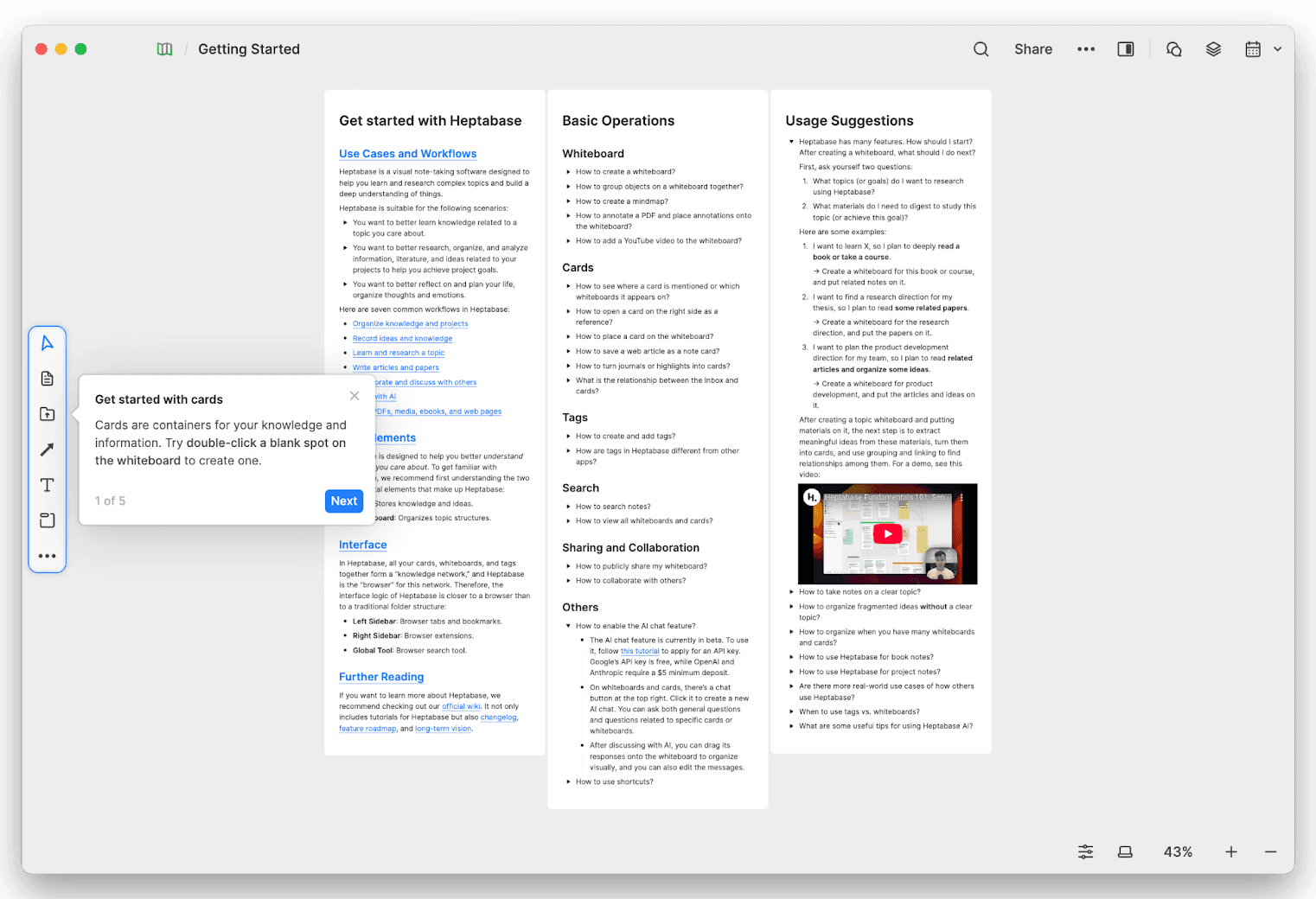
Heptabase’s onboarding whiteboard teaches new users how to create cards, organise ideas, and navigate core features.
It supports backlinks, tags, PDF highlighting, AI-generated summaries, and knowledge linking, but the power comes from how visual it is. Your second brain becomes a living map rather than a vault of notes.
It’s especially popular with designers, PMs, researchers, and people who handle long-form content because it helps you zoom out on your thinking, not just store it.
Best for you if:
You’re a visual thinker who loves clustering, sorting, or sketching ideas
You manage complex research or multi-step projects where relationships matter
You prefer cards and whiteboards over long notes
You struggle to make sense of huge blocks of text in other apps
You want a second brain that feels tactile and flexible
What users think:
A lot of the most helpful feedback on Heptabase comes from people who’ve used several second brain tools and finally found something that matches how their mind works. Tom from the Paperless Movement summed this up well in his YouTube review (see below) where he shows how the visual connections, whiteboards, and meaning-rich links create a workflow that other tools don’t quite reach.
On Product Hunt, the sentiment is strikingly consistent: Heptabase finally gives visual thinkers a home. Many people say they tried everything before realising Heptabase was the first tool that matched how their mind actually works.
One reviewer called it “the most powerful visual learning tool I’ve ever used,” praising its clear UX and rapid updates. Another said it was “game changing for brainstorming,” especially for mind mapping and fast idea synthesis.
A few especially enthusiastic notes from users:
“It’s not just a notebook — it’s a new way to extract and connect your thoughts.”
“The UI and UX show a level of thought that other tools never reach.”
“I moved from Notion and Obsidian… this became my main app.”
“Visual note-taking and mind mapping are unmatched.”
“The team listens, ships constantly, and the community feels involved.”
Some users mention performance issues on very large boards, but even those reviews stress how strong the core ideas are. Similar to Tana, the main tradeoff is portability, but for a different reason: Heptabase’s spatial whiteboards and card layouts don’t translate cleanly into other tools, so long-term exportability is trickier.
How to choose the right second brain app
A recent post in r/secondbrain really stuck with me. The OP (original poster) listed five abandoned second brain attempts — Notion, Obsidian with a swarm of plugins, even a custom React app — all of which collapsed under the weight of manual organization. What finally worked was letting AI do the sorting and synthesising, while they focused on ideas. It’s a familiar pattern for anyone who has tried to build a perfect system only to discover that “maintenance” becomes the system.
“The pattern was always the same: initial excitement → capture lots of notes → manual organization becomes overwhelming → abandon ship. This time, I tried something different: I made AI do all the boring parts. Three months later, I'm still using it. First time that's happened.” OP, r/secondbrain
This is a pertinent reminder that the right tool isn’t necessarily the one with the most features, but the one that quietly keeps your system usable even when you don’t have the energy to maintain it. That’s the bar you’re trying to clear. Not maximal power, but minimal friction.
So when you’re choosing a second brain app, here’s what actually matters:
Ease of capture
You should be able to save a thought before it disappears. Quick notes, inboxes, clipping, transcripts… whatever helps you avoid “I’ll write it later,” because later rarely comes.How much manual organization it expects from you
Tags, folders, linking, metadata — all useful, all massive sources of overhead. Tools that help you automate filing or surface things when you need them tend to last longer.Search that understands how humans remember
You won’t remember the title of the note you wrote six months ago. You will remember a phrase or a concept. Search needs to work with that, not against it.Compatibility with how you already work
If all your thinking happens in meetings, a conversation-centric tool like Radiant can function as your second brain because it automatically turns your calls into action-ready context. If you live in deep research or longform writing, a Markdown-based app might feel more natural.The right amount of automation
AI is most useful when it takes away the admin you were never going to do anyway, things like summarising, categorising, pulling context together. You don’t need a robot to run your life, just something that stops your system collapsing the moment you get busy.
Choose the tool that supports how your brain works on a normal Tuesday afternoon, not the tool you imagine you’ll maintain after watching a productivity guru on YouTube. The more honest you are about that, the stronger your second brain becomes.