


Personal knowledge management promises clarity in a noisy digital world. The idea is simple: capture what matters, connect it meaningfully, and make it easy to recall later. In practice, though, PKM can quickly become another project to manage. Endless dashboards, color-coded tags, and “second brains” fill feeds and promise productivity, but they often do the opposite.
Building a PKM system can feel productive, even when it isn’t. Designing templates, tweaking tags, and reorganizing notes can create the illusion of progress while leaving your actual work untouched.
The goal of PKM isn’t to perfect the system itself. It’s to build something light, flexible, and genuinely supportive — a way to think more clearly in the middle of everyday chaos.
What is PKM?
Personal knowledge management (PKM) is the process of collecting, organizing, and using information so it becomes usable information. Unlike traditional note-taking, PKM focuses on connecting ideas over time, turning scattered thoughts into patterns and insights you can act on.
Whether you’re managing projects, studying, or just trying to keep ideas straight, PKM helps turn scattered information into reliable knowledge you can use.
Research shows why this matters. In one large review, about one in five people identified information overload as a major source of stress at work. Another study found that actively using and applying what you capture, rather than simply storing it, has a measurable impact on productivity.
For anyone who juggles ideas or finds focus difficult, PKM can bring calm and structure to complex work. It’s also been shown to be especially helpful for people who are neurodivergent.
Here’s how to create a PKM system that fits the way you think, without overcomplicating it.
Step 1: Define your “why” before your “where”
The first mistake most people make is starting with tools instead of purpose. Before opening Notion or Obsidian, ask what you actually want your PKM to do.
Do you want to track ideas over time? Remember insights from meetings? Keep projects organized? Help you turn thoughts into action?
If you can’t describe the purpose of your PKM in one sentence, you’re not ready to build it yet.
A PKM system should serve a goal, not become one. It exists to make the path from thought to action smoother. Whether you use it to manage knowledge at work or to make sense of your own thinking, its value lies in how easily you can use it when you need it most.
Try this: Write one sentence that completes the phrase “My PKM helps me ___.” Keep it at the top of your workspace.
Example: “My PKM helps me turn client feedback from meetings into project updates.” or “My PKM helps me connect research notes to my writing ideas.”
Step 2: Start messy
The best PKM systems often begin as chaos. The goal is not to create order instantly but to start capturing what matters.
Start with one inbox for ideas. That could be a notes app, a physical notebook, a voice memo, or a folder on your desktop. The point is to collect ideas while they’re still fresh instead of waiting for the perfect structure.
If many of your ideas come from meetings or discussions, a tool like Radiant can make that process seamless. It captures the conversation automatically, summarizes what was said, and drafts the next steps for you, whether that’s a follow-up email, project update, or document outline. From there, you can review, refine, and move the draft directly into other tools like Notion or Google Docs. Radiant turns the flow from discussion to finished work into one smooth step, so capturing doesn’t interrupt your focus.
Most people give up on PKM because they confuse capturing with organizing. The act of collecting ideas should be frictionless. Sorting and structuring can come later, when you have time and context.
Try this: Create one note or file called “Thoughts today.” Add three ideas before the end of the day. No structure, just capture.
Example: Jot down a quote you liked, a half-formed idea from a meeting, or something you want to research later. Don’t worry about where it fits yet.
Step 3: Create minimal structure
Once you have enough material to work with, add gentle structure. Many people overbuild their PKM systems by trying to anticipate every possible scenario. Instead, start with three simple categories:
Projects: work or goals in progress
Ideas: insights, references, or research
Resources: material you may need later
That’s enough to begin. If your PKM only works on your best day, it’s too complicated. If you already use Notion, Apple Notes, or Logseq, set up a lightweight version of this structure there.
Frameworks like Tiago Forte’s PARA method (Projects, Areas, Resources, Archives) can help, but only if they make your setup simpler. The right structure is the one you can use when you are tired, distracted, or busy.
Try this: Make three folders or tags: Projects, Ideas, Resources. Stop there until you’ve used them for a week.
Example: Move your ongoing tasks into Projects, put saved articles in Resources, and keep all creative or work-related thoughts in Ideas. Notice which folder fills fastest before adding anything new.
A simple PKM framework
No matter what tools you use, every PKM system comes down to three actions:
Capture: Gather ideas quickly in one place from meetings, things you’ve read, or spontaneous thoughts.
Organize: Sort them by purpose or project once you have context.
Review: Revisit regularly to refine insights and act on what matters most.
This loop of capture, organize, review is what turns information into knowledge, and it’s often more valuable than any specific app or structure.
Step 4: Choose the right tool for how you think
There is no single “best” PKM tool. The right one depends on how your brain works and how much structure you like.
Tool | Best for | Why people like it | Watch out for |
Beginners or minimalists | Built in, fast, and impossible to overthink. Many users on Reddit’s r/PKMS say switching back to Apple Notes helped them focus on thinking, not system-building. Features like document scanning, note linking, and encrypted sync make it more capable than most realize. | Limited formatting and weak search make it harder to scale once your notes grow large. | |
Visual thinkers | Highly flexible with AI-powered search that feels natural. Ideal for people who like structure and integrated databases. Mobile apps are faster and smoother than early versions. | Complex interface and long-term data lock-in. | |
Deep thinkers and writers | Free, local, and endlessly customizable. Excellent for connecting ideas with plugins like Dataview and Canvas. Perfect for researchers or those who enjoy visualizing knowledge networks. | Steeper learning curve, requires setup and maintenance. | |
Daily journaling and task-oriented users | Simple out of the box, with great local file storage and easy task tracking. Fans praise its clean interface and “just works” setup that avoids plugin rabbit holes. | Mobile sync and whiteboard features are still improving. | |
Radiant | Meeting-driven professionals | Captures discussions, summarizes key points, and drafts next steps automatically. You can refine ideas by chatting with it and send drafts to tools like Notion or Google Docs in one click. | Currently Mac only, and in open beta. |
Neurodivergent thinkers | Combines notes, tasks, and AI-powered search in one place. It focuses on fast capture, automatic organization, and conversational retrieval, reducing the need for manual tagging or complex systems. | Users have reported issues with deleting tasks. |
Each of these tools can be effective, but only if you actually use them. A beautiful system that collects dust is still clutter.
One Redditor summed it up nicely:
“I forced myself to use only Apple Notes. It was horrible. Then it was amazing.”
After a week, they realized they’d stopped thinking about the app entirely and started thinking about their work again. That’s the hidden strength of simple tools: they don’t get in the way.
Where PKM tools stand today
A recent community poll on r/PKMS (440 votes, late 2025) shows Obsidian as the clear favorite, followed by Logseq, with tools like Capacities and Anytype building smaller but loyal followings.
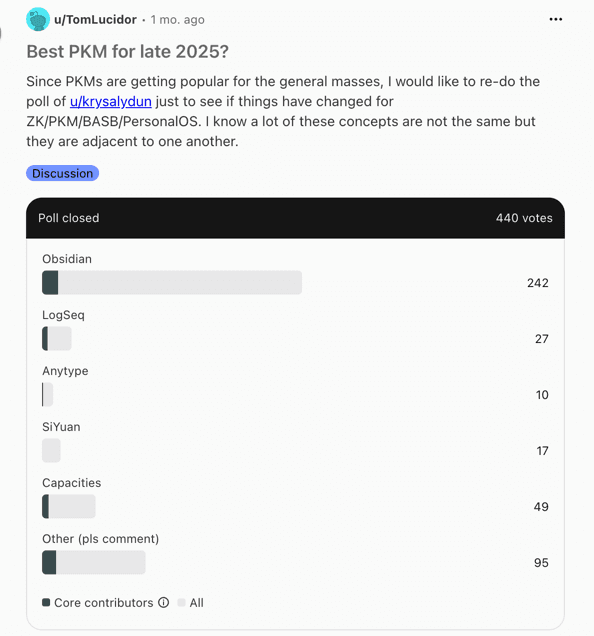
Image credit: Reddit user u/TomLucidor, r/PKMS
The results reflect what many PKM users have been saying elsewhere:
Obsidian stays on top for flexibility, control, and local storage.
Logseq wins over people who want something simpler and ready to use out of the box.
Step 5: Review, don’t redesign
PKM should evolve naturally. It does not need a full reset every few months. Instead of redesigning your setup, build in regular reviews to keep it light and useful.
A short weekly or monthly review can make a big difference. Ask yourself:
What notes or ideas am I using regularly?
What feels heavy or unnecessary?
Which parts help me think, and which just take time?
The goal is to adjust, not reinvent. A short check-in once a week is better than a perfect overhaul once a quarter. The more regularly you revisit your system, the more it starts working for you instead of against you.
Try this: At the end of the week, delete or archive one note that no longer matters. Clarity grows by subtraction.
Example: If you captured a meeting note or article summary you never revisited, archive it. A lighter system is easier to trust.
Step 6: Keep it light
Complexity kills momentum. A PKM system that feels heavy will eventually stop being used. The most effective systems are the ones that feel invisible. They get out of your way so you can think clearly. If your PKM demands more attention than the ideas inside it, it has become a distraction.
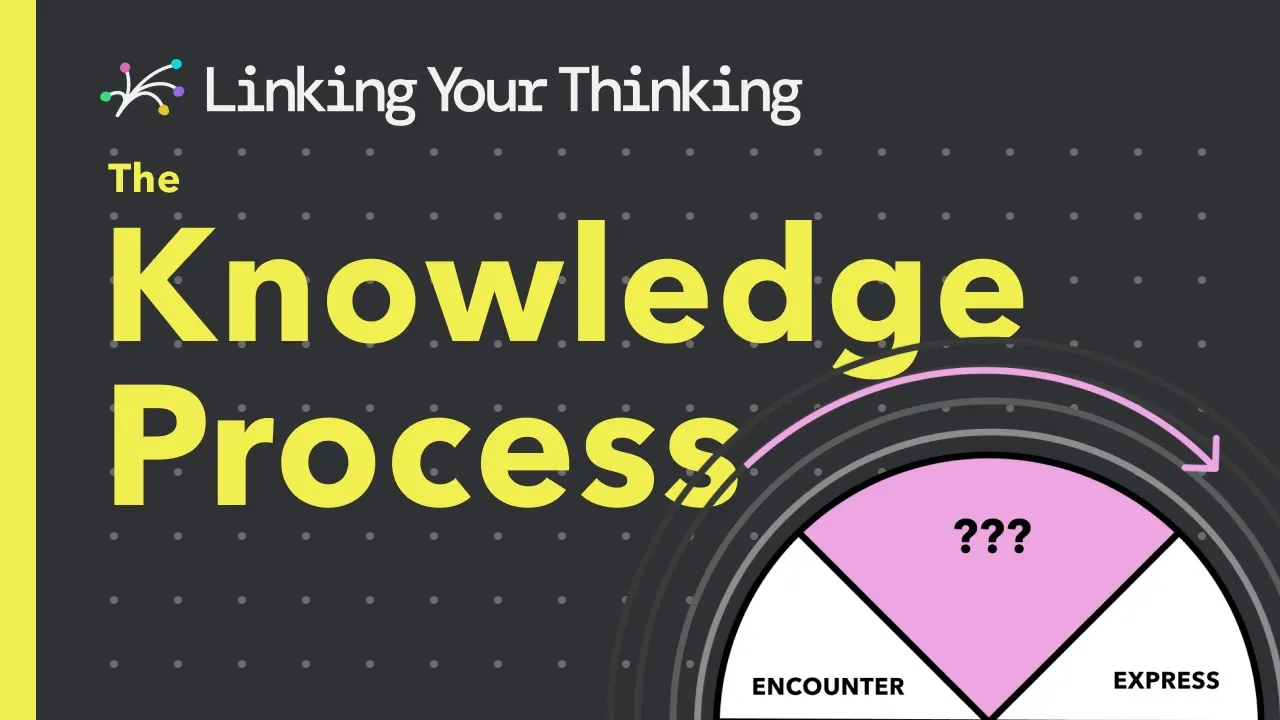
As PKM expert Nick Milo, founder of Linking Your Thinking, says, the goal is “less collecting, more connecting.” In his video below, he explains the knowledge loop: the cycle of encountering information, thinking about it, and then expressing it.
Most of us rush from input to output, reacting instead of reflecting. But as Milo puts it, “don’t cheat the middle.” That middle, the thinking space, is where ideas mature and connections form. It is also where your PKM system proves its worth.
Try this: Once a week, open a recent meeting summary or note. Link it to one other idea or project you’re working on. Those small, thoughtful connections are what keep your PKM light and alive.
Example: You finish a project meeting. Radiant captures the discussion and drafts a summary. Before moving on, you take a minute to highlight one key insight and push the summary to your project notes in Notion. The next time you open that project, the context is already there; a connected record of what was decided and why.
Final note: Make it yours
There is no right way to do PKM, only the way that helps you think better. A system built around someone else’s template may look impressive, but it will rarely feel natural.
The best PKM systems don’t exist to show how organized you are. They exist to help you make sense of what you know and act on it.
FAQ: Getting started with PKM
What is the easiest way to start a PKM system?
Capture ideas in one place first, even if it is messy. Organize later when you have context.
Is Notion good for personal knowledge management?
Yes, especially if you want a visual workspace and strong AI search. Just be aware of complexity and long-term portability.
Obsidian or Logseq: What's the difference?
Obsidian excels at customization and linking ideas with plugins like Dataview. Logseq focuses on quick daily capture, tagging, and built-in task features, with local files by default.
What is the best PKM tool for beginners?
Apple Notes or Google Keep for quick capture. If your work revolves around meetings, Radiant helps by turning conversations into summaries and drafts automatically.
Can AI tools like Radiant be part of a PKM system?
Yes. Radiant reduces manual effort by summarizing discussions, surfacing insights, and drafting next steps, then lets you move those drafts into tools like Notion with one click.
How often should I review my PKM?
Weekly or monthly works well. Focus on pruning, clarifying, and identifying next steps, not redesigning the entire system.
What are the four types of knowledge management?
Knowledge creation — Generating new ideas or insights through collaboration, research, or reflection.
Knowledge storage (or retention) — Capturing and organizing information in a way that’s easy to retrieve later.
Knowledge sharing (or transfer) — Making knowledge accessible to others through notes, summaries, or shared systems.
Knowledge application — Using what you’ve captured to solve problems, make decisions, or improve future work.